![Voltaiq_Logo_Black_Transparent- 600.png]](https://1913583.hs-sites.com/hs-fs/hubfs/Voltaiq_Logo_Black_Transparent-%20600.png?height=42&name=Voltaiq_Logo_Black_Transparent-%20600.png)
Alerts are valuable tools for staying informed about ongoing testing without the need for continuous manual monitoring. They help ensure that performance or safety issues are detected early, allowing timely analysis and response.
Common alerts used by industry peers include:
-
A cell reaches below 80% of the first cycle's capacity
-
A cell has a negative voltage, or the voltage is outside the working window
-
A cell's DCIR or coulombic efficiency exceeds a set threshold
-
A cell's test duration is longer (or shorter) than expected
How to create alerts
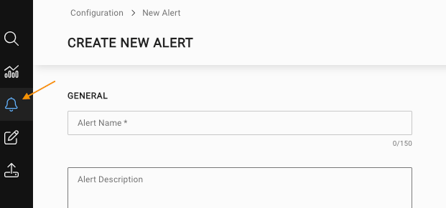
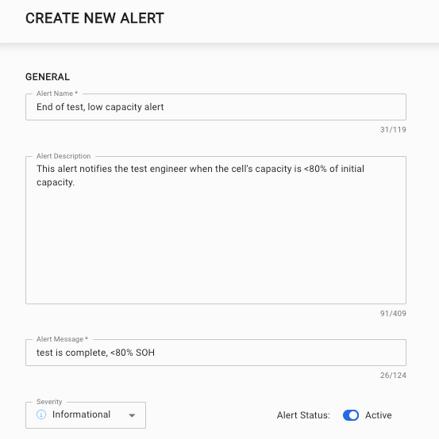
Click the alerting icon on the left side menu. Enter a descriptive alert name and description such as “Low Capacity Check” or “High Temperature Warning.” Add a short alert message that will appear in the notification when the condition is triggered. You can also set the severity level to indicate how critical the issue is, such as informational, warning, or error.
Distribution list
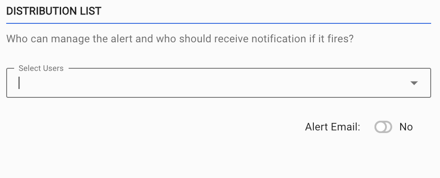
You can select who within the organization should receive a notification when the alert is triggered. You can also choose if the alert is only an in-app notification, or if it should also send an email.
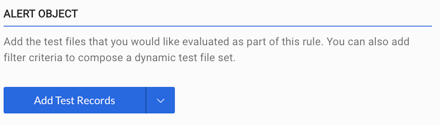
Alert object
You can add specific test records or search filters that are evaluated as part of the alert. This allows flexibility in setting up and triggering alerts, and avoids inadvertently triggering alerts for test records that are not relevant to the analysis.
Rule builder
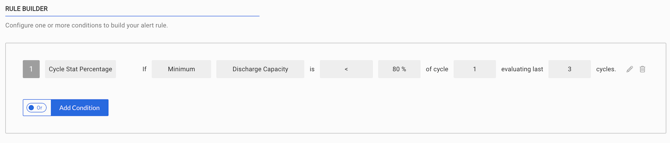
You can choose a cycle statistic as either an absolute value or a percentage, and then and specify whether it should be greater than or less than your reference value. You also set the reference alert value, the cycle on which it applies, and the number of cycles over which the condition is evaluated.
See the example values below for an example of an alert that triggers when the test reaches a discharge capacity less than 80% of the first cycle.