![Voltaiq_Logo_Black_Transparent- 600.png]](https://1913583.hs-sites.com/hs-fs/hubfs/Voltaiq_Logo_Black_Transparent-%20600.png?height=42&name=Voltaiq_Logo_Black_Transparent-%20600.png)
If you are frequently checking on a workspace, it can be convenient to make that workspace load automatically each time you open Voltaiq. This can done by pinning your workspace.
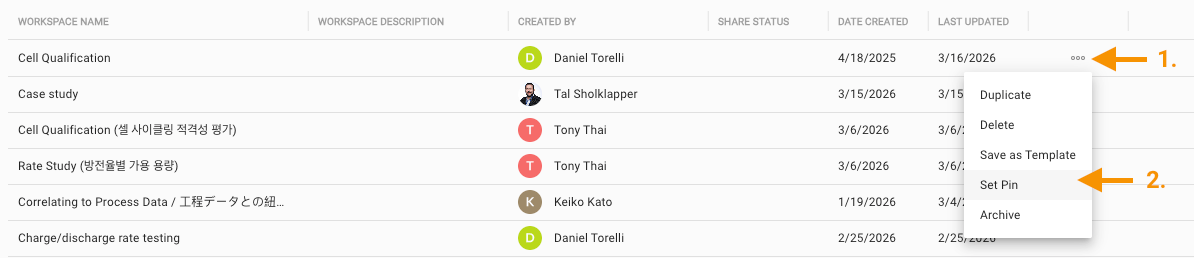
- Navigate to workspace you want to pin, and click on the three dots on the right
- Choose Set Pin
- Refresh your browser to see it in action!
Use cases for pinned workspaces
1. Test Status Monitoring: Track the status of testing by monitoring KPIs like cycles completed, last data timestamp, or channel number. Try using a metadata table to make tracking test metadata effortless.
2. Tracking Cycling Performance: Build a dashboard that tracks typical cycling metrics like capacity retention, coulombic efficiency, or DCIR.
3. Reporting & Presentation: Have a manager that wants frequent updates on a project? Pin the workspace and it'll function as a status dashboard each time they open Voltaiq.