![Voltaiq_Logo_Black_Transparent- 600.png]](https://1913583.hs-sites.com/hs-fs/hubfs/Voltaiq_Logo_Black_Transparent-%20600.png?height=42&name=Voltaiq_Logo_Black_Transparent-%20600.png)
1. Start by asking what's in the data
After loading a new dataset, use your first prompt to let Voltaiq AI orient you. It will look through all of the available data, correlate electrochemical performance with build data and metadata, and identify potential outliers and anything that looks unusual. This is faster than scrolling through the data yourself, and it gives you a shared baseline for the rest of the conversation.
|
Try a prompt like: What's in this dataset? Give me a summary, then list anything that looks unusual or worth investigating. |
2. Ask for ideas, not just answers
Voltaiq AI is more useful as a brainstorming partner than as an oracle. When you're not sure what to look at next, ask. It can scan a dataset and surface patterns that you then can decide which are worth investigating.
- "Suggest some interesting correlations in my data."
- "What features of this dataset would be worth investigating further?"
- "Which cell looks most unusual, and why?"
- "What questions should I be asking that I'm probably not?"
Treat the suggestions as hypotheses to investigate, not as conclusions.
|
Try a prompt like: Suggest some interesting correlations in this dataset. Then, suggest some next steps. |
3. Add context for things that Voltaiq AI can’t infer
Voltaiq AI infers a lot from the data itself, but some things only live in your head:
- What you're actually trying to learn.
- Your team's conventions.
- Things that aren't in the dataset.
- What's already been ruled out.
|
Try a prompt like: These are pouch cells from two electrolyte formulations, A and B, cells 1-6 and 7-12. We're trying to see if B has better calendar life. Cells 9 and 10 had a thermocouple issue around cycle 200, so treat any temperature spikes there as instrumentation noise. |
4. Show, don't just tell
If Voltaiq AI seems confused about your data structure, paste a few sample rows or the column names directly into the chat. A few lines of actual data can resolve more ambiguity than a paragraph of description.
5. Iterate in small steps
Big compound prompts ("compare cycle life across all groups, identify the worst performer, explain why, and propose a follow-up DOE") tend to produce shallow answers on every sub-task. Short prompts work better. You read the response, decide what's interesting, and ask the next question.
This also makes it much easier to catch when Voltaiq AI has misunderstood something, because you'll see the misunderstanding early on instead of finding it baked into a long final answer.
|
Try a sequence of prompts like: Prompt 1: compare cycle life across all groups Prompt 2: identify the worst performer and explain why Prompt 3: propose a follow-up DOE |
6. Be specific about scope
If you don't constrain the question, Voltaiq AI will operate over the whole dataset. This is often the desired behavior, so it is necessary to tell the AI which tests to look at specifically.
|
Try a prompt like: Looking only at the discharge cycles for cells in Group B, between cycles 50 and 500, plot capacity vs cycle and fit a linear degradation rate. |
7. Ask for the method, not just the answer
Before you trust a result, ask Voltaiq AI how it was computed. Asking for the methodology can surface assumptions that may be incorrect or irrelevant to your specific use case.
|
Try a prompt like: How did you define DCIR for this calculation? How was this pulse defined? |
8. Tell Voltaiq AI who the answer is for
"Explain this for the lab team" and "Explain this for an executive summary" will produce very different outputs. The first will get into the cycling protocol and the methodology. The second will start with the takeaway and skip the details. Tell Voltaiq AI who it is producing results for so that the outputs are more relevant.
|
Try a prompt like: Summarize this analysis as three bullet points for our weekly engineering sync. The audience is battery scientists, so don't oversimplify. |
9. Use Voltaiq AI to poke holes in your own analysis
Give Voltaiq AI your conclusion and ask it to argue against it. This catches confirmation bias in a way that's hard to do alone, and it can be especially useful before you put a result in front of leadership or a customer.
|
Try a prompt like: My current read is that the high-rate cells are degrading faster because of lithium plating. What's the case against that interpretation? |
10. Reframe the question when you're stuck
If Voltaiq AI keeps giving you answers that miss the point, the issue is usually the prompt. Try a different angle or rephrasing it in different words. For example, ask for a comparison instead of a metric, ask for a plot instead of a number, or ask what the data would look like if your hypothesis were true.
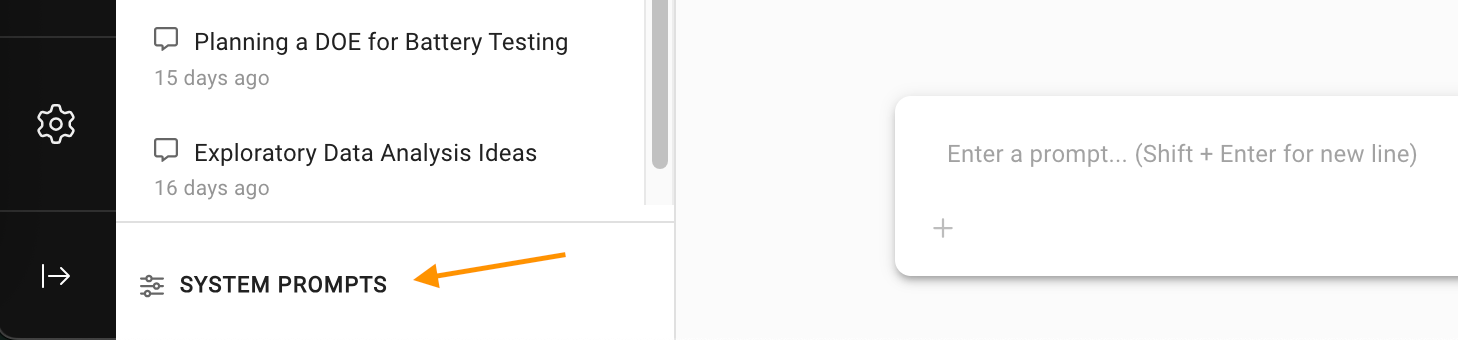
11. Use system prompts to provide user or company context
System prompts allow you to automatically add instructions to every prompt. This is useful for automatically adding context that is always true, and relevant to either you or your organization. Context specific to you should be added to user-level prompts, while context specific to your organization should be added to organization-level prompts.
|
Try a prompt like: Be concise and brief. Don’t use emojis. The reference capacity should be calculated from the highest capacity cycle in the first 5 cycles. Pulses always occur in a 10 pulse train. |
12. Repeat frequent workflows using /save-analysis and /load-analysis
Once you tune an analysis with back and forth interaction, you can reuse the context by using /save-analysis and /load-analysis. This is useful for procedures like pulse analysis. The analysis and iteration in your chat window will be saved as context instructions that can be brought into other chat windows.