![Voltaiq_Logo_Black_Transparent- 600.png]](https://1913583.hs-sites.com/hs-fs/hubfs/Voltaiq_Logo_Black_Transparent-%20600.png?height=42&name=Voltaiq_Logo_Black_Transparent-%20600.png)
A Team is assigned a set of Roles, which apply to all data to which that Team has access. Roles define the level of access that a user has over a given set of data (i.e., Project).
A Team can have multiple Roles, which combined together offer the full set (i.e., the union) of actions available across all included Roles. For example, a Team can combine the Admin and Test Deleter Roles to permit all actions across a Project.
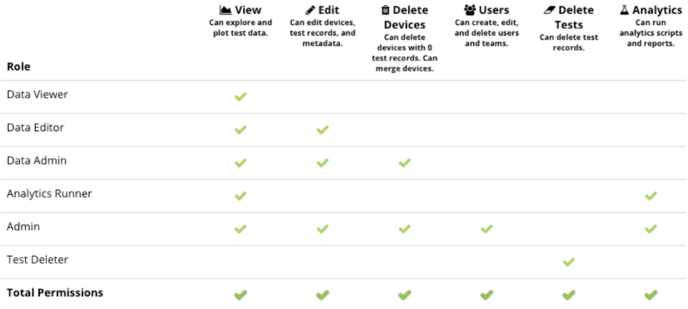
The Roles are described and shown graphically in the table below:
Data Viewer
- Explore and plot Test data
Data Editor
- Explore and plot Test data
- Edit Devices, Tests, and associated Attributes
Data Admin
- Explore and plot Test data
- Edit Devices, Tests, and associated Attributes
- Delete Devices with zero Tests, merge Devices
Analytics Runner
- Explore and plot Test data
- Run Analytics scripts and Reports
Admin
- Explore and plot Test data
- Edit Devices, Tests, and associated Attributes
- Delete Devices with zero Tests, merge Devices
- Run Analytics scripts and Reports
- Create, edit, delete users and teams
Test Deleter
- Delete test data from the system
To begin assigning roles to users, make sure you have your Projects set up and that you have your user accounts created. Afterward, you can start assigning Roles.